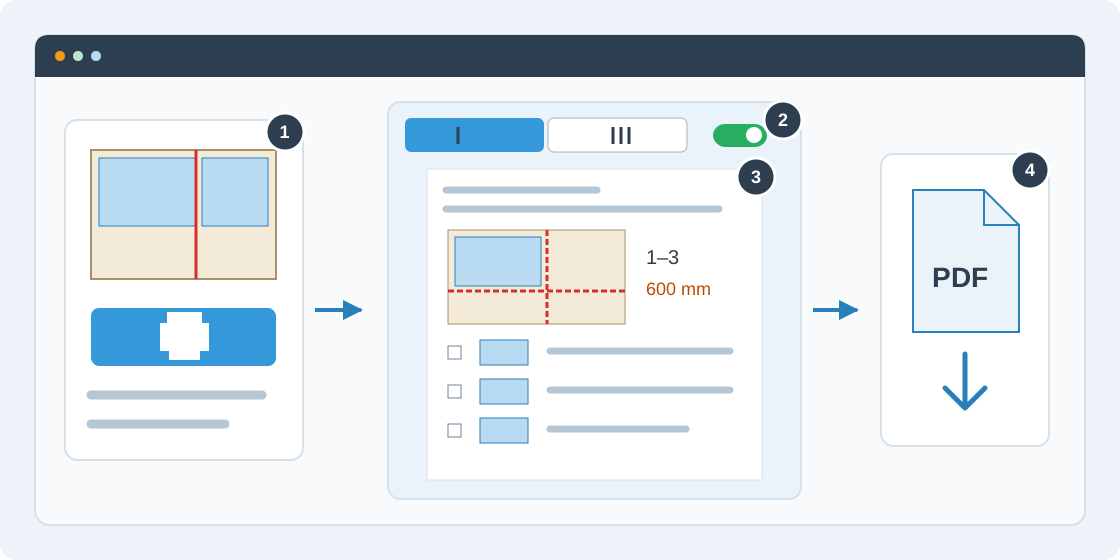
1Open Print / PDF
Select a saved run and sheet in the cutting workspace. Open Print / PDF from the cut-sequence panel, or the Saw step list card in Results → Export. Review the cutting strategy and reference corner first: they affect the printed instructions.
2Choose sheets and sketches
Choose This sheet for the current sheet's pattern, or All sheets for every pattern across the run's materials. Identical sheets are grouped with their numbers and quantity instead of repeating the same plan. Enable Step sketches for diagrams beside each cut, or disable them for a compact list.
3Review the operator plan
Check order, material, raw sheet size, kerf, trim and reference corner. The preview contains a numbered overview, a cut checklist with fence settings, and parts and offcuts with their release step. Each pattern starts on a new page and may span several pages. A custom order applies to the current pattern; others use the selected strategy.
4Print or save a PDF
Choose Print or save as PDF to open the browser's print dialog. Select a printer or Save as PDF, check the page preview and confirm. The document uses the active language and saved run in your browser, without rerunning optimization or spending a daily request. This operator list complements the separate cutting-map PDF export.